Skip to content
Kidslen
Companion app

Download the Kidslen companion app

The companion app is installed on the child’s phone. As a parent you install nothing: the family dashboard runs in any browser at app.kidslen.app.

Parent dashboard: app.kidslen.app — open it in any browser. There is no parent app to install.

Android · iPhone and iPad

Android

Available now

The main build is compiled for 64-bit phones (arm64-v8a), which covers virtually every Android device sold since 2017.

Download APK · arm64

Direct download from kidslen.app. Android 7.0 or newer.

Other builds

Use one of these only if the main APK refuses to install on the phone.

iPhone and iPad

Coming soon — TestFlight

There is no iOS file to download. Apple only allows signed apps delivered through TestFlight or the App Store, so the iPhone build ships as a TestFlight beta.

Leave your email and we will send one message on the day TestFlight invitations open.

Join the waitlist

Install the APK on the child’s phone

Do this together with your child, on the child’s phone. It takes about five minutes.

  1. On the child’s phone, open this page and tap the download button above.
  2. Android will ask about a file that did not come from a store. Open Settings → Install unknown apps and allow it for the browser you downloaded with.
  3. Open the downloaded file — from the download notification, or Files → Downloads — and tap Install.
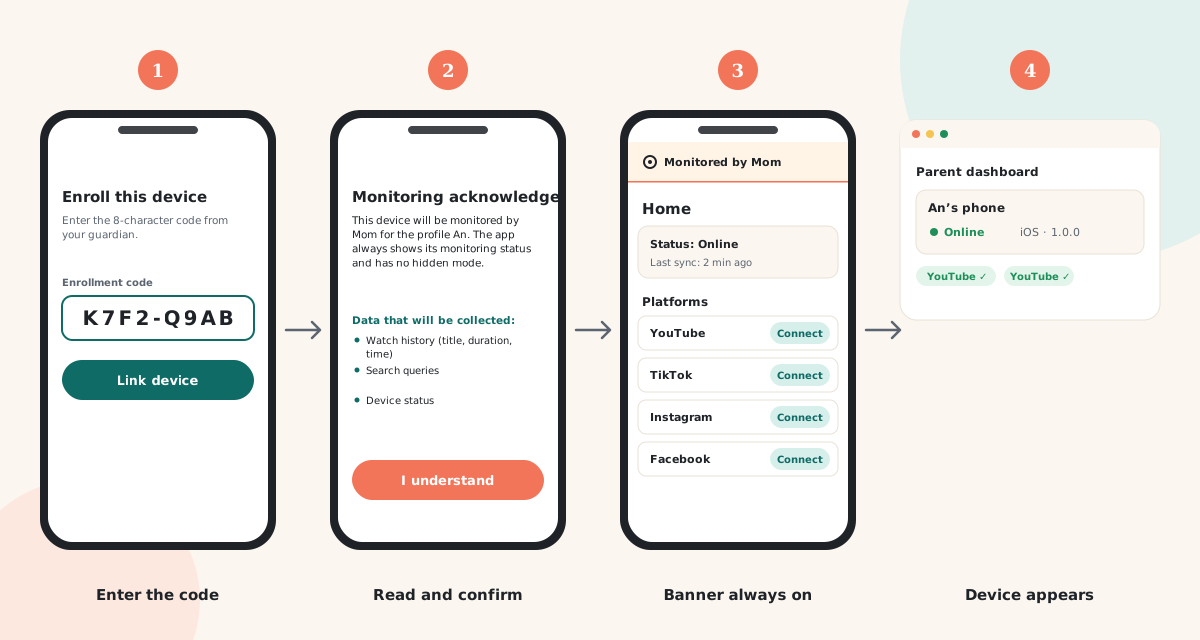
  4. Open Kidslen from the home screen and tap “Enroll this device”.
  5. In the parent dashboard, open Devices → Add device and read out the 8-character enrollment code. Type it into the app.
  6. The child reads the transparency screen — exactly what is collected and what is not — and taps Confirm.
  7. Sign in to the streaming accounts the child already uses, one at a time, on the phone.

After enrollment the phone keeps a permanent “monitored by” banner. It cannot be switched off or hidden, and the child can open it at any time to see what is shared.

Full setup guide with screenshots
Illustration of the child’s phone showing the Kidslen enrollment screen with a field for the eight-character code.
What the child sees right after installing the app: the enrollment screen, then the transparency screen.

Verify the download

Kidslen watches what a child does, and it is distributed outside the Play Store — so check that the file you received is the file we built. Every APK is published with a SHA-256 checksum beside it.

The value the command prints must match the checksum file character for character. If it does not, delete the file and download it again.

Open kidslen-companion.apk.sha256

What you need

Install it only on a phone you are responsible for

Kidslen is built for parents and legal guardians monitoring their own child, with the child informed. Putting it on anybody else’s device is not what it is for, and in many places it is against the law.

Read the children’s privacy statement